We spend our working lives on a layout almost none of us chose. QWERTY was arranged for the mechanics of 1870s typewriters, and Dvorak is the best-known attempt to put the letters where our fingers would actually put them, though it still splits the typists who have tried it.
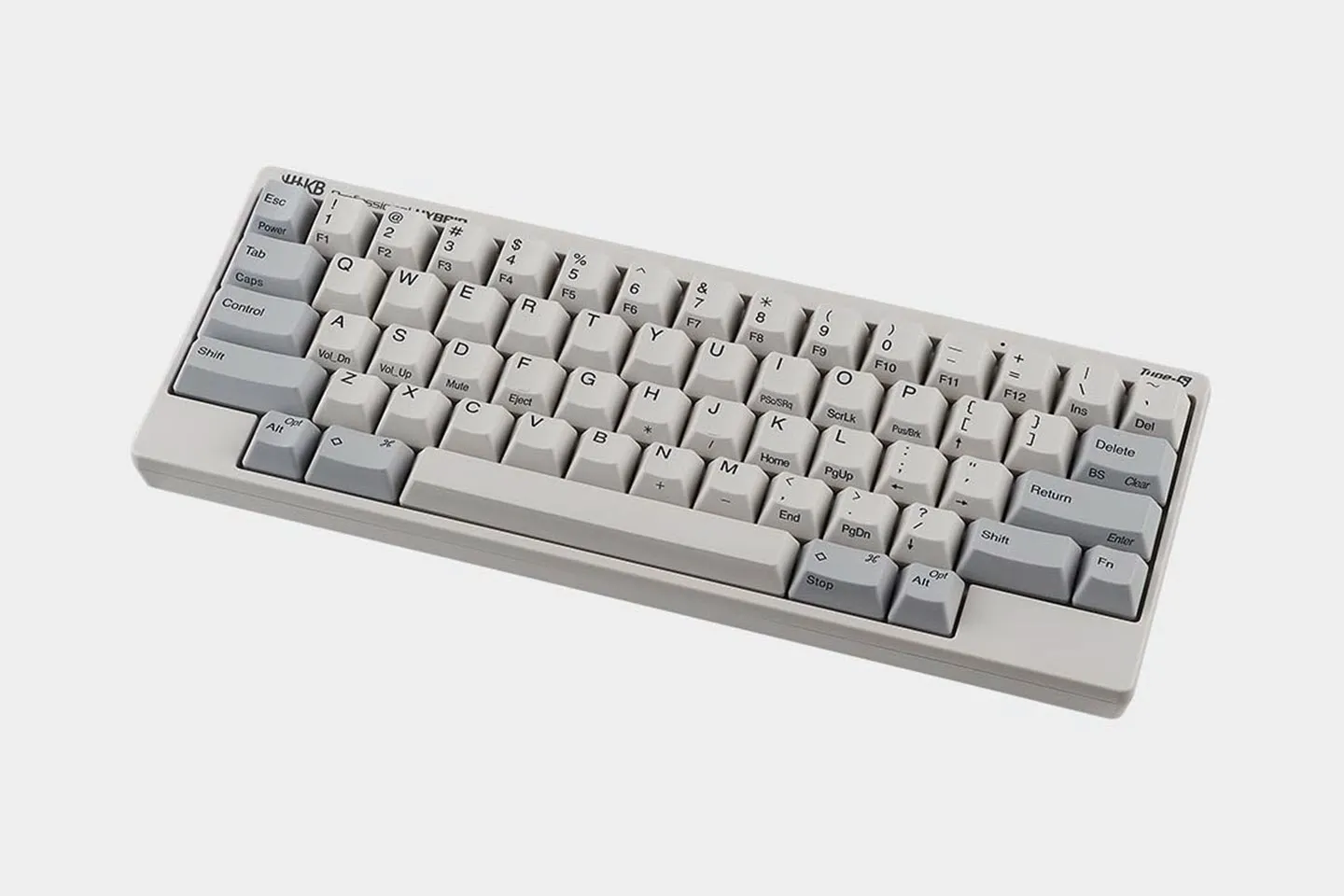
Programmable HHKB keyboards like the Professional HYBRID make the experiment low-risk, since you can load the Dvorak layout and switch back without buying anything new. This article covers Dvorak's design, its history, the evidence on speed and comfort, the real tradeoffs, and how to try it.
Key Takeaways
- The Dvorak keyboard layout rearranges the letters so the most-used ones sit on the row your fingers rest on, cutting the distance they travel.
- August Dvorak and William Dealey patented the layout in 1936; ANSI recognized a standard Dvorak arrangement in 1982.
- Speed studies are split, so the reliable benefit is reduced finger travel and comfort, not a guaranteed jump in words per minute.
- Switching keys moves common shortcuts like Ctrl+C and gaming keys like WASD, and it costs weeks of slow typing while your muscle memory resets.
- Major operating systems can type in Dvorak from a system setting, and a programmable HHKB keyboard can load it so the layout follows you between machines.
What Is The Dvorak Keyboard Layout?
The Dvorak keyboard layout is an alternative arrangement of the letter keys designed to reduce finger movement while typing English. It places the most frequently used letters, including all five vowels, on the middle row where the fingers rest, so a large share of keystrokes happen without reaching.
It is a software layout, so it works on standard hardware through your operating system's settings, changing which character each key produces rather than the physical keys. It concentrates common letters on the resting row and splits the workload so vowels sit under the left hand and frequent consonants under the right. You can compare it against other arrangements in our breakdown of keyboard layouts.
How The Dvorak Layout Is Arranged
Dvorak groups the letters by how often English uses them and which hand should carry them:
- All five vowels (A, O, E, U, I) sit on the left half of the resting row, and the most common consonants (D, H, T, N, S) sit on the right.
- Because English alternates vowels and consonants constantly, this split lets your hands trade off, one tapping a vowel while the other lines up the next consonant.
- Rarely used letters like Q, J, and K are pushed to the harder-to-reach corners.
The result is a layout that keeps more typing on the strong fingers and the central row.
History Of The Dvorak Keyboard Layout
Dr. August Dvorak, an educational psychologist, and his brother-in-law William Dealey developed the layout over the 1920s and 1930s and received U.S. Patent 2,040,248 for it in 1936. They designed it as a direct answer to QWERTY, which had been arranged in the 1870s to keep typewriter typebars from jamming rather than to speed up the typist.
QWERTY was already entrenched across millions of machines and typing schools by the time Dvorak arrived, which is much of why it never displaced the standard. The American National Standards Institute recognized a standard Dvorak layout in 1982 as standard X4.22-1983, and a later community variant, Programmer Dvorak, rearranges the number and symbol keys for people who write code.
Dvorak Vs QWERTY: What The Evidence Actually Shows
The measured case for Dvorak is stronger on comfort than on raw speed. A 1944 U.S. Navy study that August Dvorak ran reported large speed gains, while a 1956 review led by Earle Strong for the U.S. General Services Administration found no retraining advantage that justified the cost. Later analyses have landed on both sides. Economists Stan Liebowitz and Stephen Margolis, in their 1990 paper "The Fable of the Keys" in the Journal of Law and Economics, argued the Navy study was flawed because Dvorak himself oversaw it.
What most tests agree on is that Dvorak moves more keystrokes onto the resting row and reduces total finger travel. For someone drafting long English prose all day, that reduction is the payoff worth weighing, more than any promise of a higher word count. Our ergonomic keyboard overview covers how layout and hardware together affect strain.
Does Dvorak Make You Type Faster?
Not reliably, and the research reflects that. Studies going back to the 1944 Navy and 1956 GSA tests disagree, with some showing modest gains after retraining and others showing none large enough to matter. Peak speed depends far more on the individual typist and their practice rather than on the layout underneath them.
If your goal is a specific words-per-minute number, the Dvorak layout alone will not guarantee that improvement. Treat any speed improvement as a possible bonus rather than the reason to switch.
Comfort And Finger Travel
The clearest benefit of Dvorak is less motion for the same words. By placing vowels and frequent consonants on the resting row, it keeps your fingers closer to their starting position and reduces long stretches and same-finger sequences. Many typists report that their hands feel less busy over a long day, even when their speed is unchanged.
Claims that Dvorak prevents or cures repetitive strain injury are not supported by strong evidence. The reasonable expectation is reduced finger travel and a calmer typing motion, which many people find more comfortable.
The Real Tradeoffs Of Switching To Dvorak
Switching to Dvorak carries real costs that arrive before any benefit does. The layout you have used for years is stored as muscle memory, and replacing it means weeks of slow, error-prone typing while a new set of reflexes forms.
Several everyday habits also break at once, from keyboard shortcuts to games to sharing a computer with someone else. None of these are reasons to avoid Dvorak outright, but each one deserves a plan before you commit.
Broken Shortcuts And Muscle Memory
The hardest part of switching is the weeks your typing gets worse before it gets better. Expect a noticeable drop for the first few weeks as your fingers unlearn QWERTY, with steady recovery after that.
Common shortcuts move too, because Ctrl+C, Ctrl+V, and Ctrl+Z land under different fingers once the letters relocate. Apple's macOS offers a Dvorak-QWERTY-Command mode that keeps those shortcuts in their QWERTY spots while you hold Command, so copy and paste stay where your left hand expects them. On other systems you either relearn the new positions or remap them yourself.
Programming, Gaming, And Shared Machines
Dvorak's gains shrink for work that is not plain English prose. Three situations account for most of the friction:
- PROGRAMMING: Source code is full of brackets, semicolons, and operators that standard Dvorak does not optimize, so programmers may see less benefit than writers. The Programmer Dvorak variant addresses this by rearranging punctuation, symbols, and number keys to make commonly used programming characters easier to reach. While this can reduce some awkward reaches, whether it actually improves speed or comfort depends on the programmer and the languages they use.
- GAMING: Games built around the WASD movement cluster break, because those keys scatter under Dvorak and usually need remapping in each game.
- SHARED MACHINES: Shared and pair-programming machines confuse anyone who sits down expecting QWERTY, and software remaps do not always travel with you.
A layout stored on the keyboard itself sidesteps that last problem, which we cover below.
Should You Switch To Dvorak? How to Decide
Whether Dvorak is a good fit depends on how you use your keyboard and what you type most often. It can be a comfortable and efficient choice for some users, while others may prefer the familiarity of QWERTY.
The table below maps common typist profiles to what changes for each and what we would advise.
Use it to find the row closest to your own work rather than reading Dvorak as uniformly good or bad. For a wider look at matching a layout to your habits, see our guide to the best keyboard for typing.
| Typist Profile | What Dvorak Changes | Strong fit; if reducing finger travel is a priority |
|---|---|---|
| Heavy English prose writer | Most keystrokes move to the resting row, cutting finger travel across a long day | Strong fit; if reducing finger travel is a priority |
| Typist with hand discomfort | Reduced reaching and fewer same-finger sequences may calm typing motion | Worth trying, with the caveat that strain relief is not guaranteed |
| Programmer | Letters improve, but code punctuation is not optimized under standard Dvorak/td> | Consider Programmer Dvorak, or stay on QWERTY if symbols dominate your day |
| Gamer | WASD and many shortcuts scatter and need per-game remapping | Weak fit unless you keep a separate QWERTY profile for games |
| Shared or public machine user | Software remaps confuse others and may not follow you between computers | Only switch if your layout can travel on the keyboard itself and you also have a strong fit for your individual usage. |
How To Try Dvorak On An HHKB Keyboard
You can run Dvorak on an HHKB keyboard two ways, so pick the one that matches how many machines you use:
- Through your operating system, which works on any keyboard and needs no special hardware. This is the easiest way to test the layout for a week.
- Loaded onto the keyboard itself on our programmable models. Because a keyboard such as the Professional HYBRID stores its keymap on the board, your Dvorak layout follows you to any computer you plug into. If you are committed to Dvorak layout, this is the best way to save the layout for all future usage.
That on-keyboard route also carries HHKB's signature Control key placement, which sits in the Caps Lock position to keep your hands near the resting row, one of the things that makes our layout distinct from a standard keyboard. You can read more about that arrangement in our HHKB layout explainer.
Loading Dvorak Or Staying On QWERTY
Both paths start the same way, so pick the one that fits how many machines you use:
- To try Dvorak with zero hardware changes, turn it on in your operating system's keyboard settings, where Windows and macOS both include it as a built-in option.
- To make the layout travel, program it onto a compatible HHKB keyboard. The Professional series Keymap Tool and Studio Keymap Tool require a USB connection to a Windows PC or Mac, and once set, the layout is stored on the keyboard and persists across the host devices you connect to.
Blank key tops suit this well, since printed legends no longer match the output once you remap. Learn how deep the remapping goes in our fully programmable keyboards overview.
Find A Keyboard Built For The Way You Type
The layout under your fingers matters most when the keyboard beneath it is built for long sessions. If Dvorak’s goal of reducing finger travel appeals to you, you may also want to consider a keyboard designed around efficiency and customization. Options such as a compact 60% layout or a customizable keymap can help you create a setup that fits the way you type.
See the full HHKB lineup on our keyboards overview and match a model to the way you work.