Find out what the different profiles mean and how to find the best one for your unique typing setup.
Mechanical keyboards are almost infinitely customizable. Key switches play a large part in that, defining how a keyboard sounds and feels to press. But what about how it feels to rest your fingers on the keys? Your fingers are often in contact with the keyboard for hours at a time. Finding just the right shape can make a difference in your typing comfort and efficiency.
This article will introduce you to the most common types of mechanical keyboard keycaps on the market. It will also reveal some of their common uses on keyboards that you may already be familiar with, as well as less common keycaps that enthusiasts hold near and dear.
Find the perfect keycaps for every board in your collection with our Essential Guide to Keycaps.
What are keycap profiles?
Keycap profiles are categorical classifications that specify the physical shape and size of a keycap — that is, the part of the keyboard your fingers come into direct contact with as you type. Each keycap profile encompasses a certain set of shapes.
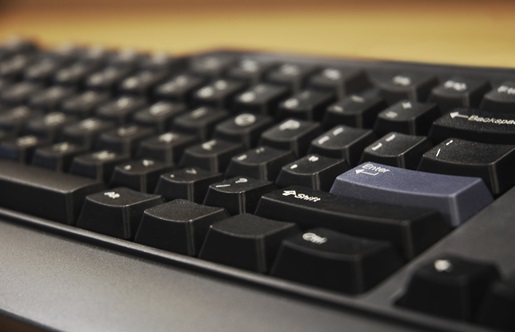
Hold up any mechanical keyboard and look at it from the side, and you’ll see that the keycaps either have an identical height and shape or take different forms depending on their rows. This is one of the primary distinctions between keycap profiles: whether their rows are uniform or are individually “sculpted” to meet the natural flexion and extension of your fingers.
Other distinctions include the height of the keycap, as well as the shape of its top. Some especially round keycaps have a deeply convex shape at the top meant to cradle your fingertips. Others are flat. Keycap profiles do not denote any other considerations such as the color of the cap or whether it has transparent or translucent parts for showing off RGB lighting effects, nor do they indicate the cap’s material makeup. The chart below illustrates some of the most common keycap profiles in circulation.

Did you know? The HHKB Professional HYBRID combines three decades of refined design with modern connectivity, making for the ideal use-anywhere board. Click here to learn more.
Why do keycap profiles matter?
Keycap profiles matter for two reasons: aesthetics and feel. We’ll address aesthetics first. Some users like the classic look of a cylindrical keycap profile, such as the OEM profile. Others prefer the more retro look of spherical keycaps, or the clean uniformity of flat keycaps. Some like keycaps that slant toward them; others like ones that slant away. Choosing a keycap profile means deciding which visuals speak to you.
Keycap profiles can also affect how a keyboard feels to use. Spherical keycaps can feel particularly comfortable to rest your fingers on, while cylindrical ones promote columnar movement. Your fingers will glide smoothly up and down the keys if you use a columnar keyboard. Both of these options may promote precise typing, as they clearly define the edges of each key. That's useful when playing video games, as pressing the wrong key can have disastrous results. It's also helpful in programming, where typos can create headaches down the line. Flat keycaps, on the other hand, trade those clear edges for low profiles that may make it easier to type quickly.
Consider the angle of your keycaps. Some keycap profiles angle away from the user at the space bar, then slowly raise their angle toward the user. That can make it easier to reach distant keys. Uniform keycap profiles forgo this usability feature.
Ultimately, keycap profiles are a question of personal preference. The best way to know which profile is right for you is to try some out for yourself.
Keycap profile comparison: high, medium, and low
Keycap profiles determine the height of your keys. In general, keycap profiles range from 2.3mm tall to 16.5mm tall. Shorter profiles mean your fingers won't need to extend as far to reach the keys. If you have smaller hands, that may make those low-profile keys more comfortable to use.
You may also benefit from sculpted keycap profiles such as the OEM profile, as they can make the farthest keys on your board easier to reach. Whatever the size of your hand, a lower keycap profile may speed up your typing simply because your fingers don't need to move as much to reach the next key.
Although OEM keycaps are considered medium height, there are more keycap profiles under its 11.9mm height than over it. For example, Cherry keycaps are also considered medium height, but they measure 9.4mm at their tallest. XDA, KAM, and G20 keycaps all come in below that number. Meanwhile, there are only a few profiles that dwarf the OEM. KAT keycap profiles measure 13.5mm, TAI HAO keycaps measure 14.8mm, and SA keycaps are among the tallest commercially available caps at 16.5mm.
Like keycap profiles themselves, keycap height is a matter of personal preference. Some feel higher keycap profiles are uncomfortably tall, leading to wrist extension and noticeable wobble. Others may find lower profiles imprecise. The best way to find the right height for you is to try out different keycap profiles and take note of what feels right.
Common keycap profiles side-by-side comparison

Keycaps.info provides a handy way to visualize each profile side-by-side (or overlaid atop each other), or you can refer to the chart above to see how the profiles compare to each other.
Common types of mechanical keyboard keycap profiles
Certain types of keycap profiles have been available for years, while others emerged more recently thanks to the booming popularity of mechanical keyboards. In either case, here are ten of the most common types of keycaps you may see when shopping for a new keyboard or standalone caps.
OEM keycap profile
In the context of keycap profiles, OEM (Original Equipment Manufacturer) denotes a size and shape common to many keyboard makers rather than a particular manufacturer's style. OEM profile keycaps are of medium height with an angled top. They also have mildly sculpted rows; the top row of keys is taller in the back and shorter in the front. That's reversed on the other side of the board, making keys easier to press with minimal finger travel from the home row. For OEM, the sculpting effect is subtle enough that you may never notice it if you don’t look at your keyboard from the side.
Considering their popularity, if you’ve used a mass-market mechanical keyboard without knowing what keycap profile it sported, it was probably OEM.
Sound:
Quick Specs: OEM keycaps
- Height: ~11.9mm
- Surface Shape: Cylindrical
- Row Type: Sculpted
Cherry MX keycap profile
Cherry MX keycaps have a similar construction to OEM keycaps. They are also of medium height (albeit slightly lower all around), their tops are similarly angled, and they too are sculpted to subtly guide the typing experience from row to row. The largest difference between the two is Cherry’s less aggressive sculpting, leading to what some enthusiasts consider to be a more visually pleasing, uniform look with minimal ergonomic sacrifices.
The influential Cherry G80 keyboard, which was first manufactured in 1988 and remains in production today, is one of the best known Cherry keycap boards in existence.
Check out our Cherry MX compatible keyboards to learn more.
Sound:
Quick Specs: Cherry keycaps
- Height: ~9.4mm
- Surface Shape: Cylindrical
- Row Type: Sculpted
The HHKB Studio uses Cherry MX-compatible stems and comes with a unique sculpted profile that is very similar to OEM, though designed specifically to accommodate the "Point Stick" (the little mouse nub) between the G, H, and B keys.
Learn more about the HHKB Studio here.
SA keycap profile
SA keycaps are some of the tallest keycaps on the market, towering over Cherries and OEMs alike. That additional height on top of the body of the board allows for substantial sculpting. Each row makes up part of a semi-cylindrical shape you can see even without turning the board to the side. The keycap tops are both angled and concave (the “S” in the name stands for “Spherical”), leaving a significant indent within each key for fingers to rest on.
The unique height and concave appearance of SA keycaps make them a popular choice for modern keyboards aiming for a retro aesthetic by using more round keycaps. Ironically, the original runs of SA keys were unsculpted (a design choice that is preserved in the modern DSA keycap profile).
Sound:
Quick Specs: SA keycaps
- Height: ~16.5mm
- Surface Shape: Spherical (Concave)
- Row Type: Sculpted
ASA keycap profile (Akko’s Hybrid)
ASA is Akko’s proprietary take on the classic SA profile. It was designed to capture the vintage, rounded look of SA while reducing the extreme height that many users find fatiguing. By bringing the height closer to an OEM level, it offers a "best of both worlds" experience: the "thocky" sound and spherical finger-cradling of high-profile caps, but with an ergonomic slant that doesn't strictly require a wrist rest.
The tops are spherical and slightly smaller than standard OEM caps, which guides the fingers toward the center of the key. It has become one of the most popular profiles for enthusiasts who want a "premium" aesthetic on a budget.
Sound:
Quick Specs: ASA keycaps
- Height: ~13.5mm
- Surface Shape: Spherical
- Row Type: Sculpted
KSA keycap profile (Keychron’s Redesign)
KSA is Keychron’s modern evolution of the SA profile. It maintains the high-profile, retro aesthetic reminiscent of 1970s IBM beamspring terminals but features a revised "sculpt" to improve visibility and reach. Compared to standard SA, KSA often feels slightly more aggressive in its row angles, especially on the bottom rows, to make the transition between keys feel more intuitive on modern, flat keyboard cases.
Because of its height and the volume of plastic used (usually thick PBT), KSA produces a deep, resonant sound profile. However, due to its ~16.5mm height, most users will prefer using a wrist rest with this profile to avoid strain.
Sound:
Quick Specs: KSA keycaps
- Height: ~16.5mm
- Surface Shape: Spherical
- Row Type: Sculpted
MDA keycap profile
MDA is essentially a "reduced-height" SA profile. Originally created by MelGeek, it features a very wide surface area on the top of each keycap, which many users find significantly more comfortable for touch-typing than the narrower tops of Cherry or OEM profiles. Despite being "medium-height," it feels quite planted and stable.
The sculpting on MDA is unique; the rows have a gentle, organic curve that follows the natural flexion of the fingers. This makes it a top choice for "finger pad" typists who like to feel a lot of surface contact with each keystroke.
Sound:
Quick Specs: MDA keycaps
- Height: ~12mm
- Surface Shape: Spherical (Concave/Wide)
- Row Type: Sculpted
Flat keycap profile
Flat keycaps are not a specific kind of keycap profile, but rather an overarching category representing a common design choice. As the name suggests, their tops form a flat surface, without any of the angled or convex shapes commonly employed elsewhere. They are also typically unsculpted, which is helpful in cases where the user may wish to swap their keycaps’ positions from their standard configuration; Trying to do so with sculpted keys would create a muddled and hard-to-use design.
While once fairly common in a variety of mass-market boards, flat keycaps have fallen out of favor due to the rise of so-called “Chiclet” keycaps.
Sound:
Quick Specs: Flat (DSA) keycaps
- Height: ~7.6mm
- Surface Shape: Spherical or Flat
- Row Type: Uniform
“Chiclet” keycap profile
Nicknamed for their resemblance to the brand of candy-coated chewing gum, “Chiclet” keycaps sport a uniform look and an extremely low profile that seems to barely rise from the surface of the board. While some early “Chiclet” keyboards were marked by wobbly buttons that felt odd when pressed off-center, modern designs typically use stable scissor switches to create a more satisfying and reliable keypress action.
“Chiclet” keycaps are useful for keyboards that need to take up as little vertical space as possible, making them a popular choice for laptops. In particular, Apple has run with this profile for use in its Macbook line as well as its standalone Magic Keyboards.
Take a look at our keyboards with blank keycaps for a chic, minimalist appearance.
Sound:
Quick Specs: Chiclet keycaps
- Height: ~2mm to 5mm
- Surface Shape: Flat
- Row Type: Uniform
KAT & KAM keycap profile
KAT (Keyreative All Touch) and KAM are sister profiles. KAT is a medium-high, sculpted profile that sits perfectly between Cherry and SA. It is widely praised for its incredibly smooth, satiny PBT finish and its "spherical inclined" design, which allows fingers to glide between rows with very little resistance.
KAM is the uniform version of KAT. It uses the exact same height and spherical surface shape as a middle-row KAT keycap, but applies it to every single row. This makes KAM highly versatile for non-standard layouts (like Dvorak or Colemak), as keys can be moved to any row without changing the physical feel or height.
Sound:
Quick Specs: KAT keycaps
- Height: ~13.5mm
- Surface Shape: Spherical
- Row Type: Sculpted
Quick Specs: KAM keycaps
- Height: ~9.1mm
- Surface Shape: Spherical
- Row Type: Uniform
HHKB Topre keycap profile
Topre keycaps are a proprietary design specifically for electro-capacitive switches. While they are similar to the Cherry profile, they are often noted for having a more "aggressive" sculpt in certain rows (specifically R4) to improve reach and tactile feedback. Their unique cylindrical shape is designed to cradle the finger naturally, making them a gold standard for professional typists and programmers.
Sound:
Quick Specs: HHKB Topre keycaps
- Height: ~9mm to 11mm (Medium; sits between Cherry and OEM)
- Surface Shape: Cylindrical
- Row Type: Sculpted
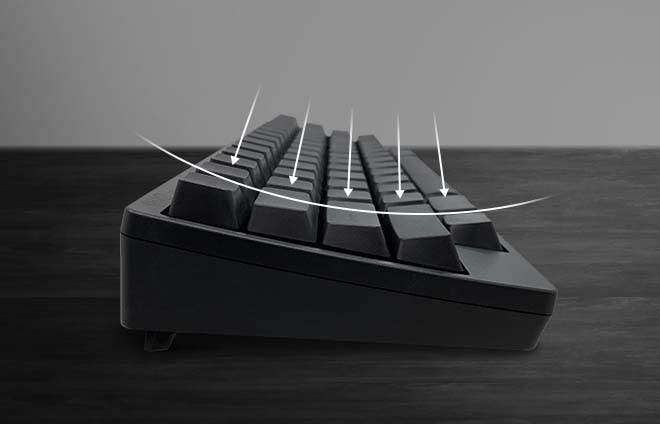
The Professional line of HHKB keyboards utilizes Topre keycaps and switches to provide the most ideal feel and typing experience possible. The ideal curvature keeps your hands and arms from getting tired, even during extended programming, coding, and keying sessions. Compact size and near-symmetrical layout makes your fingers feel comfortable staying on the ‘Home row,’ so the board feels like an extension of your body.
Learn more about HHKB Professional keyboards and their Topre keycaps here.
Did You Know? If you want to learn even more about the different types of keycaps and beyond, we’ve put together a handy guide to online mechanical keyboard communities.
Keycap profile comparison chart
|
Profile |
Height |
Surface Shape |
Row Type |
Best For |
|
Chiclet |
2mm – 5mm |
Flat |
Uniform |
Ultra-low profile builds & laptops |
|
DSA (Flat) |
7.6mm |
Spherical |
Uniform |
Ortholinear boards & fast typists |
|
XDA |
9.1mm |
Spherical |
Uniform |
Modern aesthetics & wide surface area |
|
KAM |
9.1mm |
Spherical |
Uniform |
Non-standard layouts (Dvorak/Colemak) |
|
Cherry |
9.4mm |
Cylindrical |
Sculpted |
Enthusiast Gold Standard: Gaming & Typing |
|
Topre |
9mm – 11mm |
Cylindrical |
Sculpted |
Professional work (HHKB/Realforce) |
|
OEM |
11.9mm |
Cylindrical |
Sculpted |
Beginners & standard pre-built boards |
|
MDA |
12.0mm |
Spherical |
Sculpted |
Ergonomic comfort with a wide landing |
|
ASA |
13.5mm |
Spherical |
Sculpted |
SA aesthetic without the extreme height |
|
KAT |
13.5mm |
Spherical |
Sculpted |
"Thocky" sound with smooth transitions |
|
KSA |
16.5mm |
Spherical |
Sculpted |
Retro look with optimized row angles |
|
SA |
16.5mm |
Spherical |
Sculpted |
Vintage aesthetics & maximum "Thock" |
Try Topre keys for long-lasting comfort
Whether you're typing or gaming, you need a keycap profile that fits your fingers. That's why the HHKB Professional HYBRID uses Topre keycaps and an ergonomic keyboard curvature to achieve long-lasting comfort. Combine that with best-in-class Topre switches, and you get a comfortable, tactile keystroke with unrivaled precision.
Looking for other boards with the Topre keycap profile? Check out the full line of topre HHKB keyboards today.
Note: Information and external links are provided for your convenience and for educational purposes only. PFU America, Inc. makes no representations about the contents, features, or specifications on such third-party sites, software, and/or offerings (collectively “Third-Party Offerings”) and shall not be responsible for any loss or damage that may arise from your use of such Third-Party Offerings.