Mechanical keyboard switches are the heart and soul of your board. They're the mechanisms underneath your keycaps that determine how precise and responsive your keys are, as well as the sound and feel of your typing. However, deciding on the best switches for your board requires an understanding of the different mechanical keyboard switch types, their unique characteristics, and their pros and cons for different uses.
The three primary types of mechanical keyboard switches are Linear (smooth and silent), Tactile (a noticeable bump at actuation), and Clicky (a bump accompanied by an audible click). Choosing between them depends on whether you value speed, physical feedback, or acoustic performance. Below, we'll break down these three types of keyboard switches, their characteristics and best uses, and which switches you should consider based on your profession or individual preferences.
Jump to a section:
- What are mechanical keyboard switches?
- Understanding switch anatomy: switch actuation force and travel distance
- The three main types of keyboard switches
- Some other mechanical keyboard switch types
- Mechanical vs. membrane switches
- Matching Your Switch to Your Craft: A Guide by Profession
- The Topre Difference: A Specialized Electrostatic Capacitive Switch
What are mechanical keyboard switches?
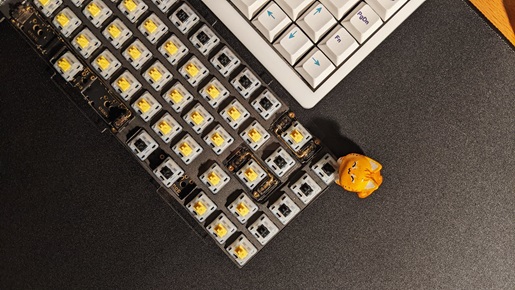
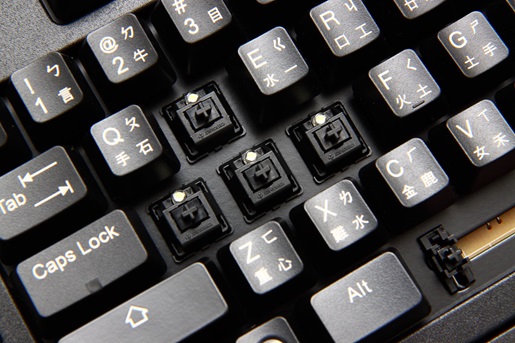
Mechanical keyboard switches are a small piece of a keyboard that typically consists of an upper housing and a base housing, a stem to mount the keycap and travel with each press, and metal contacts to register a press when a connection is made. It's these components that decide things like pre-travel and total travel distance, operating force, tactile point, reset point, and more.
To put it in simple terms, you can think of your mechanical keyboard's switches as the guts of the keys, and depending on what's under your keycaps, you'll experience different sounds, physical feedback, and actuation points where your keypresses are registered.
What most folks consider when deciding between the various types of keyboard switches are actuation sound and typing feel. These characteristics are crucial not only to your comfort and satisfaction with a mechanical keyboard, but also how quickly and accurately you’ll be able to type according to your personal preferences. Naturally, these distinctions are important to consider whether you're using your keyboard for work, gaming, or general use.
Understanding switch anatomy: switch actuation force and travel distance
When choosing from the variety of available mechanical keyboard switches, there are two values to consider on the specs sheet before you start digging into other features: switch actuation force and travel distance.
Switch actuation force
Switch actuation force represents how much force your fingers need to use in order to activate the key when pressed. It’s usually measured in grams; the lower the value, the fewer grams of pressure it takes to translate a key press into seeing the letter or number appear on your computer screen.
Travel distance
Similar to switch actuation force, travel distance measures the total distance (usually in millimeters) required before key actuation and it can be broken down further into total travel and pretravel:
-
Total Travel: The entire distance the key moves from the top until it "bottoms out" (usually 4.0mm on HHKB keyboards).
-
Pretravel (or Actuation Travel): The distance the key moves before the keyboard registers the press (0.0mm on HHKB Professional keyboards).
Finding the right balance between these values will offer you the most personally comfortable typing experience possible. Some typists prefer a light touch, while others may want to slam the key in as far as it will go before they see words appear on screen. Keep these values in mind as you shop for switches, as they will likely determine how much you like using the keyboard you end up buying.
The three main types of keyboard switches
Along with its keycaps, a keyboard's mechanical switches are a key factor distinguishing it from the rubber dome keyboards commonly bundled with pre-built desktops or available as lower-priced accessories. That's why it's crucial to have at least a surface-level understanding of the three most common types of keyboard switch: linear, tactile, and clicky. Most of the big keyboard switch manufacturers label them red (linear), blue (clicky), and brown (tactile), but that's by no means a uniformly accepted rule.
In terms of compatibility, most of what you’ll find on the market are "Mechanical X-Point," or MX-style, switches, introduced by German manufacturer Cherry in the 1980s. While Cherry itself sells complete keyboards, many more keyboard makers use Cherry switches or MX-inspired variations like the Linear MX switches used in the HHKB Studio. The market also hosts a range of less common switch types that aren’t based on the MX style, so it’s always best to confirm your keyboard’s specs before making a purchase.
Here are the three main types of keyboard switches:
Linear switches: the choice for speed and competitive gaming
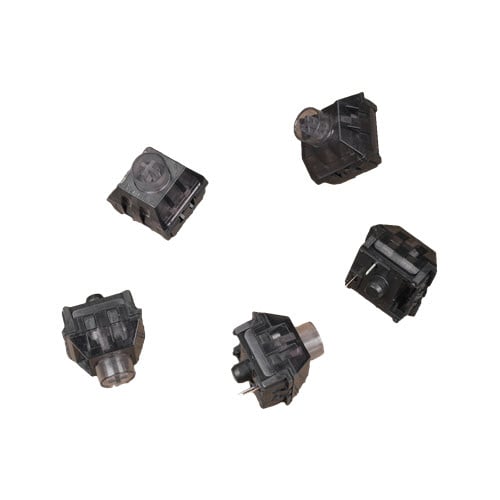
The linear-style switch found in the HHKB Studio
The linear mechanical switch is the most straightforward of the three types, providing a light, smooth, and consistent keystroke all the way through the actuation point. Unlike tactile and clicky types, linear switches don't elicit a bump or click before registering a press, which means the only thing you'll feel as you type are the keycaps against your fingers, the pressure of the springs, and the base of the keyboard if you bottom out presses. That's because the mechanism allows the switch's stem to travel uninhibited, whereas the other types of keyboard switches elicit a physical bump on the verge of actuation.
Because there's nothing in the way between the weight of your finger and the switch's actuation point, linear switches are typically the fastest to use. People using custom keyboards for competitive gaming often prefer linear switches for that reason, as the milliseconds in time you save registering a keypress can be significant in fast-paced games. Linear switches are also generally the quietest of the three main types of mechanical keyboard switches, which is a plus if you're sharing a space with someone and don't want the sound of your typing to bother them.
One of the downsides to linear switches is that their increased typing sensitivity makes it easier to slip and register an incorrect keypress. This can hinder your productivity when adjusting to a new keyboard. Also, some find it difficult not to bottom out linear switches, which could result in more finger fatigue and more wear and tear on the switch.
Clicky mechanical keyboard switches: preferred by writers and other typing enthusiasts
Whereas linear keyboard switches are light, sensitive, and quiet, clicky keyboard switches are heavier to press, more deliberate, and noisy. A clicky switch's mechanism includes a tactile resistance that you must push past to register a keypress, and the feedback and signature loud click it produces lets you know it went through. This is helpful if you prioritize accuracy when typing.
Another benefit to clicky switches is that it's easier to avoid bottoming out presses, which means less strain on your fingers and the mechanisms. Last but far from least is the sound itself. Many enthusiasts spend years searching for just the right kind of audio feedback from their keyboards, and if you want the biggest sound possible, look no further than a clicky switch.
On the other hand, clicky keys can be a nuisance to coworkers or roommates if they don’t enjoy the sound quite as much as you. It's best to consider your setting before opting for clicky keys. While they're an excellent choice for those who delight in noisy keys and who can tightly control their working or gaming space, the tactile resistance and clattering associated with these switches make them less suited for gaming and crowded environments.
Tactile mechanical keyboard switches: the perfect middle ground
Often considered a middle ground among the various types of mechanical keyboard switches, tactile switches produce a similar bump before actuation as clicky keys, but with a much more muted sound. Though usually not as quiet as linear keys, tactile switches are a go-to choice for enthusiasts who want feedback without the clicky orchestra.
Whereas linear and clicky switches are best suited for specific purposes, tactile switches are all-purpose performers, perfect for those who use their keyboards for work, play, and leisure. However, the tactile switch's adaptability means it may not be the best choice for any one function, lacking the speed required for competitive gaming and the auditory feedback beginner and professional typists might require from their keyboards.
Linear, Clicky, and Tactile keyboard switch comparison table
|
Switch Type |
Noise Level |
Tactile Feedback |
Typing Fatigue |
Best For |
|
Linear |
1/5 (Quiet) |
None (Smooth) |
Low |
Gaming / Fast Typing |
|
Clicky |
5/5 (Loud) |
Sharp (Click) |
Medium |
Data Entry / Writers |
|
Tactile |
3/5 (Moderate) |
Moderate (Bump) |
Low |
All-purpose / Coding |
This video provides a sound comparison between each of the switch types discussed above.
Some other mechanical keyboard switch types
While the most common types of keyboard switches are explained above, they’re not all you need to know about. You’ll really want to pay attention to keyboard compatibility while perusing storefronts that trade in these types of switches, as these aren’t all guaranteed to be compatible with the typical MX-style board setup.
- Low-profile: These specialized key switches use the same basic mechanisms as most on the market, but they’re designed with a lower profile to decrease the total travel distance, bottom out faster, and support a more minimalist aesthetic.
- Optical: In optical switches, the physical switch used to register a keypress is replaced by an infrared light that tells the computer when a key has been actuated.
- Hybrid: A hybrid switch uses a membrane similar to a standard rubber dome keyboard that closes a circuit to provide actuation, but it incorporates elements of a mechanical switch to achieve feedback.
- Electrostatic capacitive: These switches build on the hybrid concept to combine a precise actuation point coupled with a satisfying tactile bump. Topre is the most famous type of electrostatic capacitive switch, found in the HHKB Professional line of keyboards while Topre Type-S switches provide a near silent typing experience without diminishing the overall feel.
Mechanical vs. membrane switches
Of course, mechanical keyboards aren’t the only option available. Membrane keyboards offer a functionable, if less premium, typing experience for those looking for a keyboard on a budget.
Unlike mechanical keyboards, which operate with their individual moving switches, membrane keyboards rely on three separated plastic sheets. The top and bottom sheets are coated with conductive ink, while the middle layer spaces the other sheets apart to prevent shorts. On top rests a rubber membrane covered in little domes for each key. When you press down on a key, the dome on the rubber membrane presses down into the stacked layers of sheets, bridging the contact and sending the resultant key press command to your computer.
This design comes with its own pros and cons, especially when compared to mechanical keyboards. Mechanical keyboards are premium devices, built for long-term use and highly-responsive key presses, making them generally more expensive than membrane keyboards. Meanwhile, membrane keyboards are built to be mass-produced, making them simultaneously less expensive and less durable. They also tend to be less comfortable to type on for extended periods of time, and you cannot swap out switches like you can on a hot-swappable mechanical keyboard.
While every keyboard is different and desired typing experiences are highly personal, you can sum up the differences between mechanical and membrane keyboards like this:
- Mechanical keyboards cost more, but offer a better build quality, are highly customizable, and offer more ergonomic design that makes for a much more comfortable and enjoyable typing experience. They are built for writers, programmers, gamers, and anyone who works in front of a keyboard for several hours at a time.
- Membrane keyboards cost less, but may lack the customizability, responsiveness, and ergonomics of mechanical keyboards. They’re best for general, casual use rather than any specific typing purpose.
Matching Your Switch to Your Craft: A Guide by Profession
Choosing a keyboard switch isn't just about personal taste; it’s about the nature of your work. The physical demands of a competitive gamer are vastly different from those of a novelist or a software engineer. Below is a breakdown of which switch types excel in specific professional environments.
|
Profession |
Recommended Switch Type |
Why it Works |
|
Software Engineer |
Tactile |
The "bump" confirms actuation, reducing coding errors. |
|
Creative Writer |
Clicky or Tactile |
Provides a rhythmic, typewriter-like feedback for flow. |
|
Competitive Gamer |
Linear |
Smooth, consistent travel allows for rapid-fire inputs. |
|
Corporate Professional |
Silent Linear / Tactile |
Professional feedback without disturbing office colleagues. |
|
Data Entry Specialist |
Heavy Linear or Tactile |
Higher resistance prevents accidental numerical strikes. |
Software Engineers: Precision Over Speed
For developers, the goal is accuracy. A stray character in a line of code can lead to hours of debugging.
- The Choice: Tactile switches (like the ones found in our HHKB Professional line of keyboards) are the gold standard here. The physical "bump" lets your brain know exactly when a key has been registered, allowing you to move to the next character without "bottoming out" the key. This prevents the accidental double-taps that often occur with hyper-sensitive linear switches.
Read our guide to the best keyboards for programmers to learn more.
Writers & Journalists: Finding Your Rhythm
Writing 5,000 words a day requires a switch that offers a sensory "reward".
- The Choice: Many writers swear by Clicky switches for their auditory feedback, which helps establish a typing cadence. However, if you work in a café or a shared space, a High-End Tactile switch (or the legendary Topre "thock") provides that same satisfying snap without the ear-piercing noise.
Gamers: The Need for Speed
In fast-paced genres like FPS or MOBA, every millisecond counts.
- The Choice: Linear switches are the undisputed kings of the gaming world. Because there is no bump to overcome, the travel is perfectly smooth. This allows for faster double-taps and "rapid trigger" motions. If you're using the HHKB Studio for gaming, the included linear switches are designed to minimize fatigue during long sessions.
Read our guide to the best keyboards for gaming to learn more.
The Hybrid Professional: Shared Office Spaces
If your desk is within earshot of others, your switch choice becomes a matter of office etiquette.
- The Choice: Silent Linear or Silent Tactile variants. These switches utilize internal dampeners to mute the "clack" of the plastic hitting plastic. For the ultimate professional experience, the HHKB Professional HYBRID Type-S utilizes specialized Topre silent internals that offer a "pillowy" feel that is virtually silent to those around you.
The Topre Difference: A Specialized Electrostatic Capacitive Switch
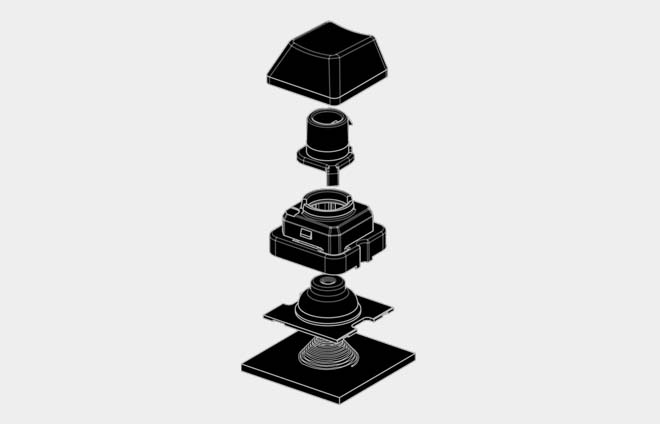
Topre is a unique type of electrostatic capacitive switch that differs significantly from standard mechanical switches. Instead of metal contacts, Topre's resistance comes from the collapse of a rubber dome, which provides a distinct, "snappy" tactile bump that starts right at the press (0.0mm of pretravel).
This design, found in keyboards like the HHKB Professional line, is prized by professional typists for its feel, accuracy, reduced typing fatigue, and the signature “thock” sound only found with Topre switches. To dive deeper into how this technology works and why it’s considered the "Gold Standard," read our dedicated guide: Topre Switches Guide: Why They Are Still the Gold Standard in 2026.
Discover your new favorite keyboard by checking out the full line of premium mechanical keyboards from HHKB.
Note: Information and external links are provided for your convenience and for educational purposes only and shall not be construed, or relied upon, as medical advice, treatment, or diagnosis. PFU America, Inc. makes no representations about the contents, features, or specifications on such third-party sites, software, and/or offerings (collectively “Third-Party Offerings”) and shall not be responsible for any loss or damage that may arise from your use of such Third-Party Offerings. Please consult a licensed professional regarding your specific health needs.